Posts

Pushing Your First .NET Core 1.0 RTM Apps to Cloud Foundry and PCF Dev

Pushing a .NET Core 1.0 RTM application to Cloud Foundry is a fairly straightforward process. Follow the instructions at  https://www.microsoft.com/net/core to get your development machine installed with all the necessary binaries, and create the "Hello World" application as they show you on that page. Next, go to  https://docs.asp.net/en/latest/getting-started.html and either create a new project as that page shows you or modify your "Hello World" app from earlier using the instructions on that page.  Run your app locally per the last couple instructions on that page to make sure it works. Next, we need to make some slight tweaks to the application to work better with Cloud Foundry.  Follow the instructions at  https://github.com/cloudfoundry-community/dotnet-core-buildpack#using-samples-from-the-cli-samples-repository to add a dependency to your project.json to allow configuration of the Kestrel server via command line arguments.  You will ...
Recovering from vCenter Appliance Disk Errors on LVM Devices

Let's say you have a ghetto vSphere home lab. And let's say that you are running a vCenter Appliance to manage that home lab because you didn't want to devote a whole physical machine to that task because you are cheap. And let's say you are running a small storage server for that home lab that is hosting the disks for that vCenter Appliance. And let's say that that home storage server is running on a UPS, but _sometimes_ the power goes out for a little bit longer than your UPS can handle and you haven't had the time to configure that file server to shutdown the vSphere hosts before it shuts itself down. Everything comes back up after the power failure, but your vCenter Appliance VM is complaining about file system errors and won't boot.  How do you fix that? Well, the good news is that there are some great guides out there to get you part of the way to a solution.  I followed  http://www.opvizor.com/blog/vmware-vcenter-server-appliance-vcsa-filesy...

My Process for New Spring Projects

Image
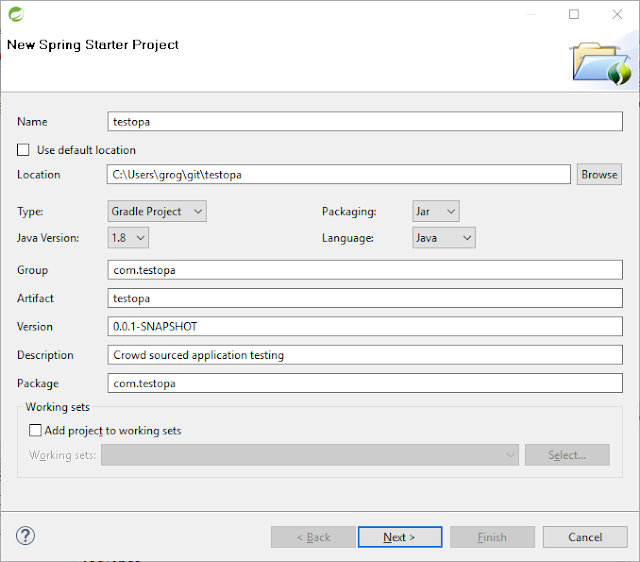
I've been getting a lot of questions lately about how to start new Spring projects and what is the best approach.  I don't know if I have the best approach or not, but here is an approach that has worked well for me.  I think it is a pretty good way to get started and iterate on a project. With a new workstation,  I usually grab the latest versions I can get of Java , Git  CLI,  Spring Tool Suite , Gradle  CLI, and Node.js .  Grab the appropriate versions for your OS, and install each of them in turn. Next, make a directory to store your project code separate from your Eclipse workspace.  I like to create a "git" directory in my user directory to store my project code.  Trust me, you will find this useful later. After installing Spring Tool Suite, I add in support for Gradle by going to the "Help" -> "Dashboard" menu, and then clicking the "IDE Extensions" button in the "Manage" section of the resulting page.  Then, und...

Cold Smoked Salmon on the Big Green Egg

I didn't come up with these instructions, but I wanted to capture them for future reference. I have done hot smoked salmon on the BGE before, but I wanted to try my hand at cold smoking before the weather got too hot here.  We went to Harry's Farmers Market (basically a Whole Foods) to snag some really nice salmon.  It was a bit pricy for a piece of a filet, but we don't eat smoked salmon all that often.  I figured it was worth the splurge, so we got about a 1.5 lb piece of farm raised salmon. Based on my completely unscientific experiences with salmon, I tend to find that farm raised salmon has more fat.  To me, this fat tends to make for a more tender fish and lends a buttery flavor to the finished product.  I have read that the farm raised salmon tend to have a more rich diet than wild and this is the reason for the higher fat content.  Whatever the reason, the farm raised salmon I can get near me tends to be better than the wild salmon that I can get. A...

P.S. Don't Forget About .NET, Java, and Javascript!

Image
Analysis of Job Salary and Demand by Skill from gooroo.io Sure, to many developers, they aren't as "cutting-edge" as working with Ruby and they aren't as exciting as Python, or Go. By most measures though, .NET, Java and Javascript are still the leaders in terms of number of jobs available and the salaries those jobs command . This means that companies are still hiring like crazy for these skills. That means they are still creating and maintaining applications that use these technologies. This is why it is critically important for anyone creating a platform to run applications to be able to support all 3 of these top-tier languages and the services required by them. Cloud Foundry , the open source Platform as a Service project, has had great support for Java and Javascript (as well as Ruby, PHP, Python, Go and many other languages) for quite some time with its flexible Buildpack system. A huge hole in Cloud Foundry, however, has been support for .NET appli...

Cloud Foundry Buildpacks in Restricted Networks

Cloud Foundry provides a flexible system called "buildpacks" to handle applications that use different runtimes and frameworks. Traditionally, many buildpacks reach out to public sources on the internet for the various runtimes and other supporting binaries needed to support an application. In on-premise deployments on Cloud Foundry, however, it is quite common to limit the access of Cloud Foundry to the internet. One of the great things about buildpacks are that developers can pull them in without having to work with the Operations/Architecture teams.  Unfortunately, a more secured type of an environment can be problematic for many buildpacks. Luckily, there are some strategies you can employ to make custom buildpacks available for developers to use in a more protected deployment of Cloud Foundry. NAT/Transparent Proxy One simple strategy is to allow Cloud Foundry to have access to specific locations on the internet via NAT or some other sort of transparent proxy...

Ghetto Cloud Foundry Home Lab

Image
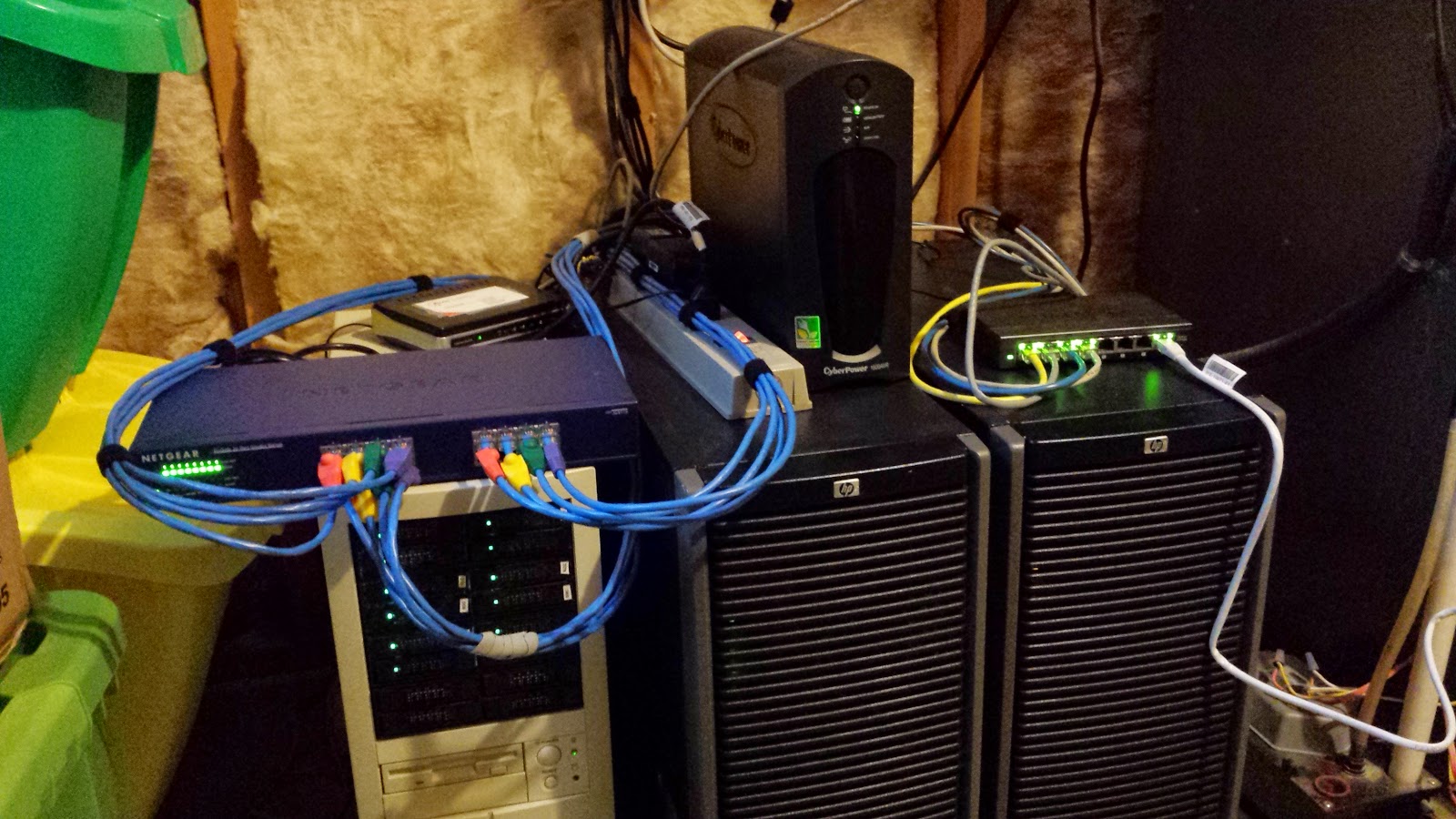
Over the past few months, I've been cobbling together my own Lab to be able to gain experience with Cloud Foundry.  Sure, I could have gone the much simpler route of bosh-lite , but I wanted to get a broader set of experience with the underlying IaaS layer in conjunction with working with Cloud Foundry. My lab hardware was purchased from various places (eBay, Fry's, etc) when I could get deals on it. Rocking the Ghetto Lab At a high level, the hardware looks like this: Machine CPU Memory Storage Notes HP Proliant ML350 G5 2x Intel Xeon CPU E5420 @ 2.50GHz 32 GB (Came with some disks, but mostly unused) vSphere Host 1, Added a 4 port Intel 82571EB Network Adapter HP Proliant ML350 G5 2x Intel Xeon CPU E5420 @ 2.50GHz 32 GB (Came with some disks, but mostly unused) vSphere Host 2, Added a 4 port Intel 82571EB Network Adapter Whitebox FreeNAS server Intel Celeron CPU G1610 @ 2.60GHz 16 GB 3x 240GB MLC SSDs, in a ZFS stripe set, plus spinning d...