Posts

Suppressing messages in FreeNAS/FreeBSD about unknown USB Devices

I like to run my FreeNAS server on a UPS to make sure that it doesn't die in the middle of some file operation, and can do an orderly shutdown in case of a power failure. I'm also very cheap, so I went down to my local Fry's to find what sort of UPS I could get for a low cost. I ended up buying a CyberPower 645AVR UPS expressly for this purpose. Of course, I made sure to connect the UPS to the FreeNAS box via USB to allow FreeNAS to know when the power is out. Upon doing this, I was able to configure FreeNAS to start up the UPS service, and begin monitoring the UPS status. Unfortunately, I was noticing messages in my log every few minutes like the following: Dec 30 14:18:18 xxxx root: Unknown USB device: vendor 0x0764 product 0x0501 bus uhub3 So I did a little digging and found out that FreeBSD, the underlying OS for FreeNAS, uses a service called devd to manage automated actions for USB (and other) device events. After reading up on the man page about the /etc/devd...
Git for Recovering SVN/ClearCase/CVS/"Other Old School SCM Tool" Users

Git is really a great way to encourage sharing of code and contributions to projects.  However, as a lot of folks out there, I came from a different background of SCM tools that really weren't as good as dealing with lots of parallel development tracks, branches, and multiple repository coding.  If you are new to Git like I am, you might find the following info useful to demystifying git and find that git is fairly easy to work with if you have a better understanding of how it works. I would first suggest you have a read of the freely available Pro Git.  It gives you the basics of git, and also points out differences that you will see if you are coming from other SCM tools.  You can read that online at http://git-scm.com/book or buy it for yourself. One area of particular interest for me is the ability to combine multiple commits into a single commit.  This feature is called "squashing" in git.  It's important to me because I like to commit often. ...

Tweaks for Slow SSH from a Mac to Linux based Fusion VMs Running avahi

I create lots of little VMs in Fusion for doing demos and experiments, and what-not.  To make life a little easier with all these little VMs, I like using avahi to provide automatic mDNS without having to configure the hosts file on my Mac or having to futz around with a DNS.  It makes things really simple as all I have to do is set the host name on the VM machine, and then make sure avahi-daemon is installed and running.  However, there are a few tweaks I need to perform to make sure that avahi works well in this type of a setup. First I disable IPv6 in the VMs.  Fusion doesn't allow IPv6 over it's NAT'ed network as of Fusion 6, so to prevent slow downs due to the Mac trying to connect to the VMs over IPv6, it's best to make sure that the VM isn't using it.  If you allow the VMs to directly connect, then IPv6 is ok, but I don't like to have to have a network attached to my machine just to start up the VMs.  For CentOS 6, if use the procedure at  htt...

Simpler SSH through Bastion Host

I found this article very helpful in a situation I had where I needed to SSH through a bastion host to get to some other machines.  Mainly just reposting this to save it for future use. http://monkeyswithbuttons.wordpress.com/2010/10/01/ssh-proxycommand-and-putty/

Google Chrome Omnibox Instant Search Fix

UPDATE 6/18/2014: It seems that Google has removed the setting referenced in the post below.  There are some folks that have commented that disabling the  chrome://flags/#omnibox-auto-completion-for-ime setting seemed to help them.  I believe the issue I faced originally had to do with some plugin that was registering itself to the omnibox search APIs, and then it was behaving poorly.  As such, I'm not sure the referenced setting would have fixed that sort of problem.  One suggestion would be to disable plugins one at a time and then test omnibox search after each one is disabled. I've been using Google Chrome as my browser for quite a while. One of the features they added to the browser early on was the ability to search the web by simply typing in the location bar. Soon after, Google also added the ability for top search results to show up in a dropdown list under the location bar as you typed. This feature was called "Instant", and made it even faster ...

Linked Clones for VMware Fusion with Somatic

Update:  As of Fusion 6, this utility is no longer needed, as Fusion 6 includes proper cloning capabilities. In the course of my day job, I need to be able to create VMs to try out my companies software as well as show customers how they might use our products to solve their problems.  To speed up the process of creating new and one-off VMs, I created a little utility called Somatic to help me do that much faster and by using much less disk space than copying a VM. I use a Mac and, since the company that I work for produces a pretty good desktop virtualization solution for the Mac , I use VMware Fusion to host my VMs.  One challenge that I have is that those VMs take up a lot of space per VM, and that eats up the SSD in my MacBook fairly quickly. VMware Workstation for Windows has a fairly nice feature that allows you to create VMs that are based on other VMs called Linked Clones.  Linked Clones allow you to create separate VM that points to the disks of anoth...

Simulate RabbitMQ via RabbitMQSimulator on CloudFoundry

Image
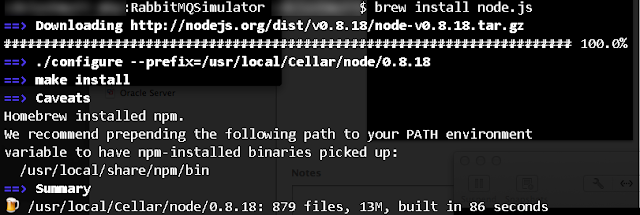
EDIT:  These instructions are a bit out of date on the Cloud Foundry portion since the release of Cloud Foundry v2 at http://run.pivotal.io .  I'll post an updated entry describing how to publish to the latest version of Cloud Foundry.  For the mean time, you can access my updated version of the simulator at  http://rabbitmq-sim.cfapps.io Alvaro Videla recently posted a great article about a simulator he created to help describe how RabbitMQ passes messages.  This simulator can be run locally, and you can even set up examples ahead of time, export them, and then re-import them as needed.   I was surprised there weren't instructions given for deploying this to Cloud Foundry as well, so I went through the process and documented my steps.  Obviously, for demo purposes, you would probably want to run the the simulator locally to prevent any reliance on the network.  However, for experimentation purposes, Cloud Foundry makes it simple to host and ...